Run your whole shop in one place
Till, stock, sales, customers and team in one place. Take cash, Mobile Money and card payments, and keep every sale safe when the network drops.
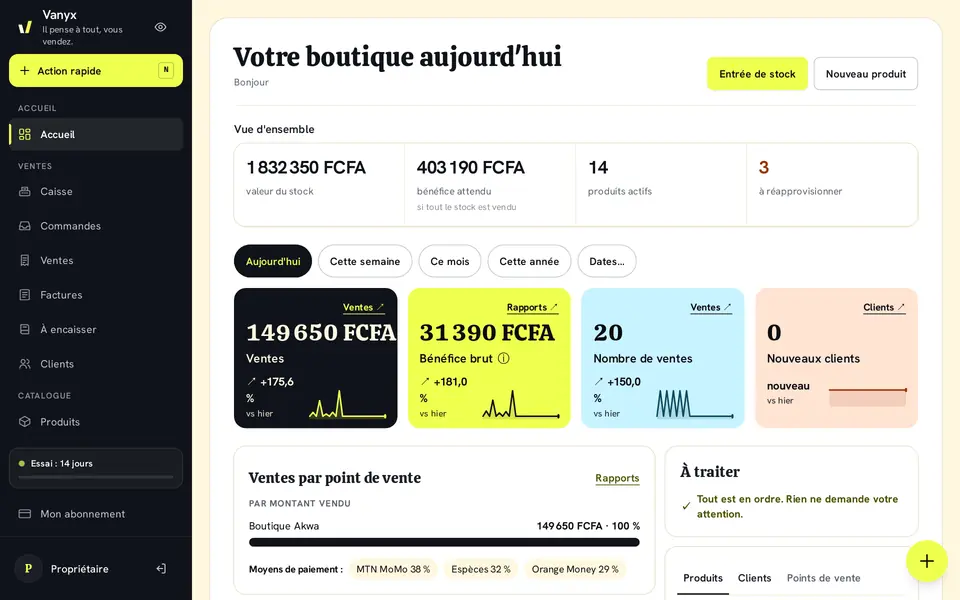
Discover Vanyx
Every part of your business has its place, and they work together: a sale at the Till updates the stock and the customer’s account.
Till
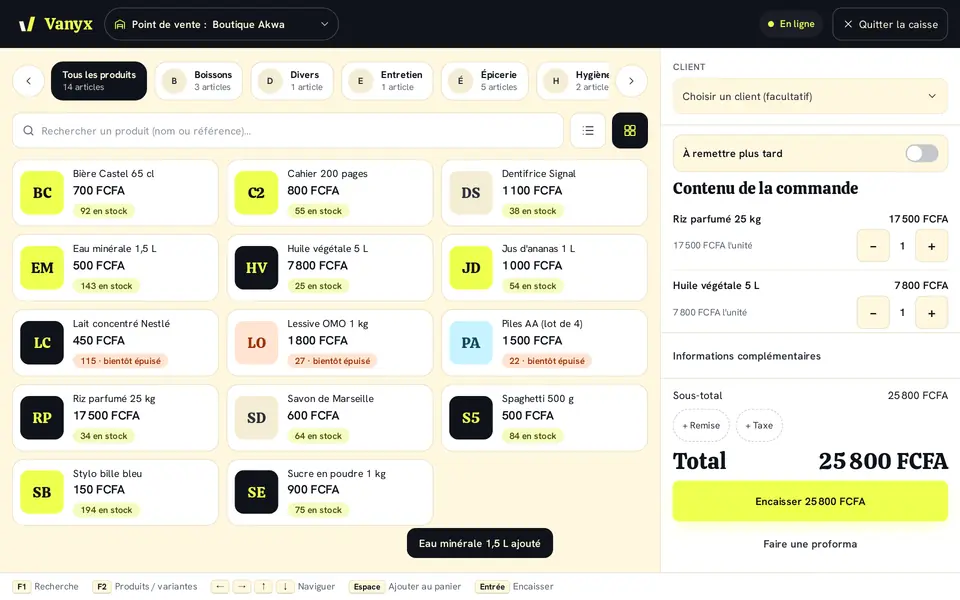
Take payments in a few taps: cash, Orange Money, MTN MoMo, Wave, Moov Money, card or on credit.
Stock and movements
Stock in, stock out and transfers of several products at once, with quantities always up to date.
Sales and receipts
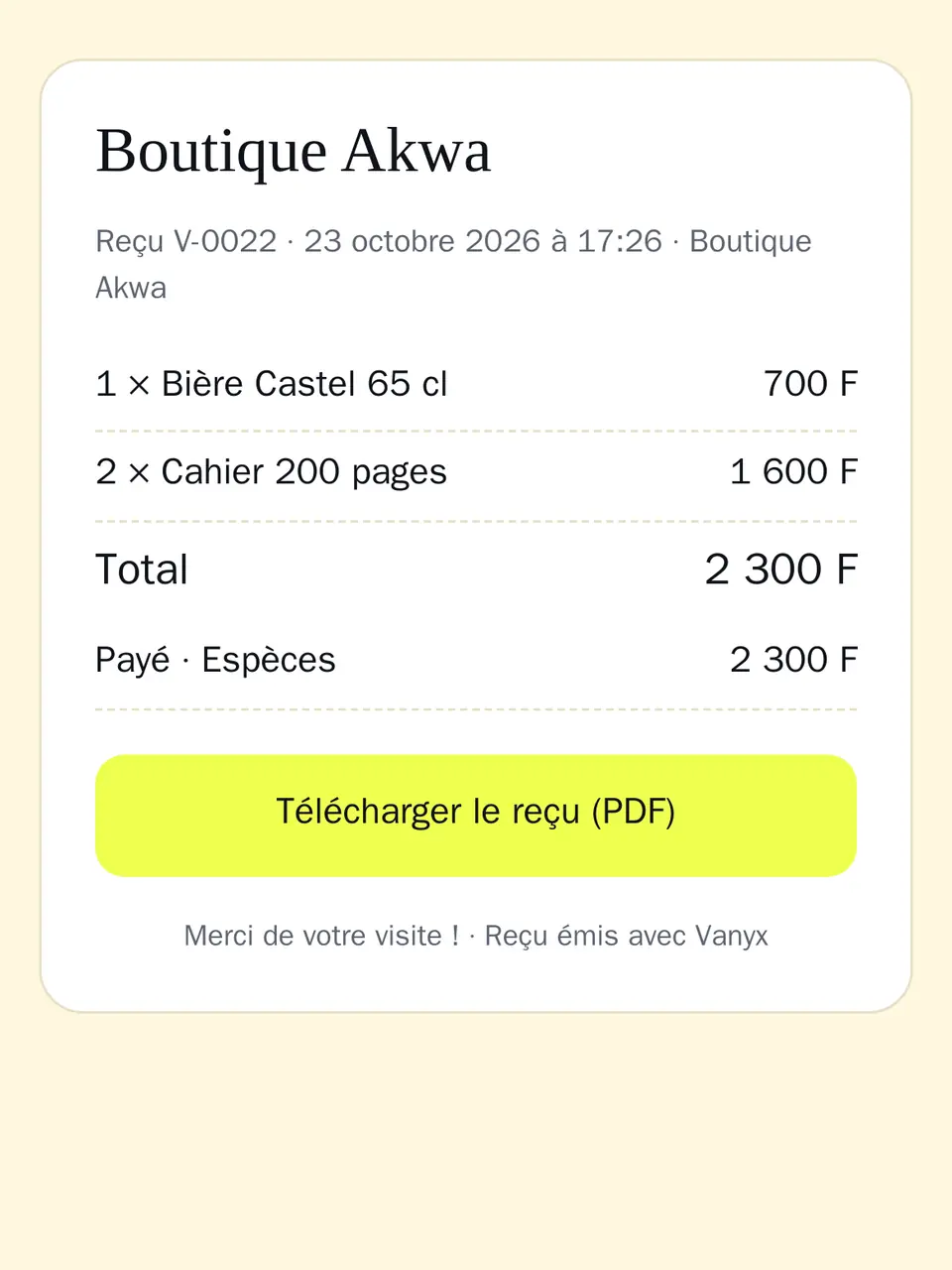
Every sale has its own number and receipt, ready to send to the customer in one tap.
Customers and credit
See what each customer still owes and send a polite reminder on WhatsApp.
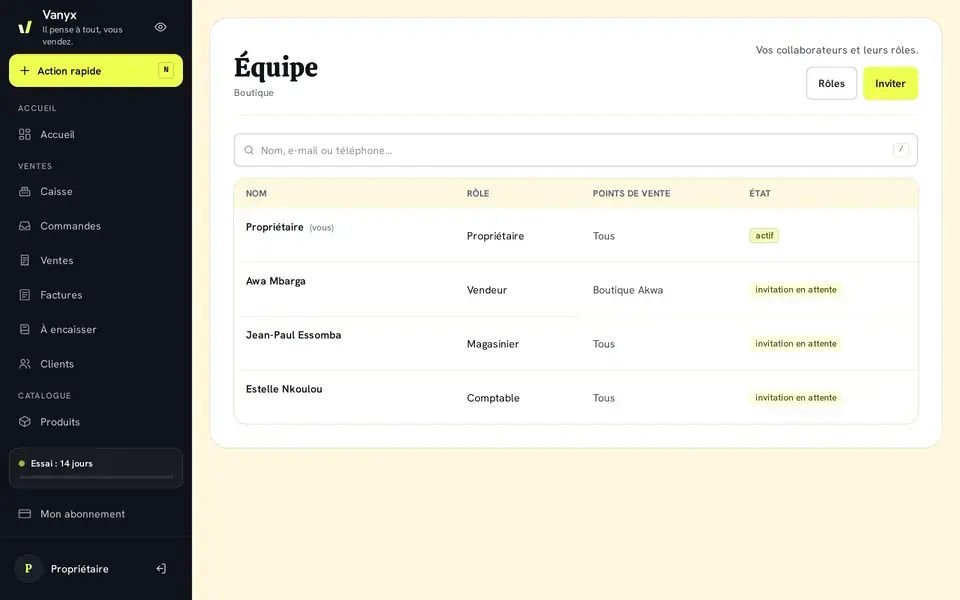
Team and permissions
One account per employee, ready-made roles and the shops each person can access.
“Who did what” log
Important actions are recorded: who did what, and when.
Simple accounts
See how much you earn, shop by shop, with no accounting jargon: sales, expenses and cash.
Offline
Network down? Your sales are kept and sent as soon as it comes back.
New: Vanyx adapts to your business
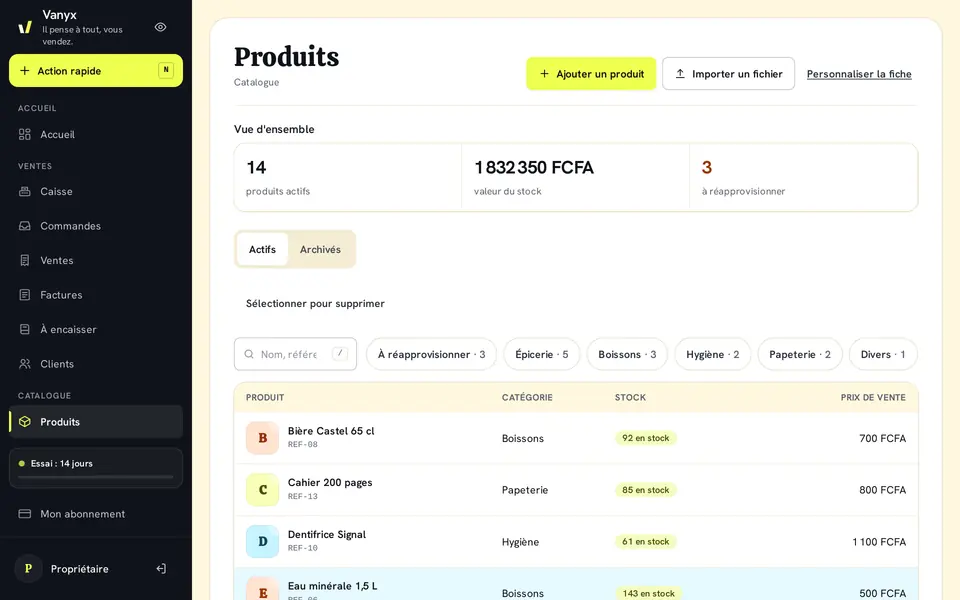
Product pages made for your business
Pick your line of business (beauty, food, hardware, clothing, phones…) and the product form shows the fields that matter to you, such as brand, size, color or expiry date.
Variants: size, shade…
One product in several sizes or shades, each with its own price and stock, at the Till and in stock movements.
Import your products from Excel or CSV
Already have your list? Import it from an Excel or CSV file instead of typing everything again.
The tools that help your business grow
Take payments without keeping customers waiting
- Find a product by its name or its barcode.
- Cash with change to give back, Orange Money, MTN MoMo, Wave, Moov Money, or on credit.
- Each seller opens their own Till, so you know who took what.
Impress your customers
Send the receipt in one tap.
- Sent by WhatsApp or SMS
- Send the receipt to the customer in one tap, by WhatsApp or SMS.
- One number per sale
- Find a sale by its number, or by the customer’s name or phone.
- A link to the receipt
- The customer opens their receipt with no account and no app to install.
Everything you need to sell more
Today’s sales and best sellers
See what sold today and which products drive your revenue.
Customer credit and reminders
Unpaid balances are tracked by customer, with a reminder message ready to send.
Several shops and transfers
Shop, warehouse, second store: the stock of each one and the transfers between them.
Low-stock alerts
An alert level for each product: low stock and sold-out items are flagged in the stock list.
Get started in 3 steps
- 1
Create your shop
No credit card needed.
- 2
Add your products
Fill in a table to add several at once.
- 3
Sell
At the Till, even when the network drops.
Invite a shop owner, earn a month
Every Vanyx shop has its own referral link, ready to send in one tap on WhatsApp.
30 days of free trial for the person you invite
The shop owner you invite gets a full month to try Vanyx instead of 14 days, with no credit card.
A free month for you
As soon as the person you invited pays their first subscription, a free month is added to yours. No limit: every invited shop owner who subscribes earns you a month.
Your link is waiting for you on the “Referral” page of your shop.
Pricing
Every plan starts with a free trial. After that, pay with Orange Money or MTN MoMo.
Boutique
Pour démarrer (EXEMPLE — à ajuster)
FCFA 10,000 / month
or FCFA 100,000 / year
- Shops : 1
- Employees : 2
- Custom roles : Unlimited
- Recommended
Boutique Pro
Pour les commerces qui grandissent (EXEMPLE — à ajuster)
FCFA 25,000 / month
or FCFA 250,000 / year
- Shops : 3
- Employees : 5
- Custom roles : Unlimited
Entreprise
Pour les réseaux de boutiques (EXEMPLE — à ajuster)
FCFA 60,000 / month
or FCFA 600,000 / year
- Shops : Unlimited
- Employees : 15
- Custom roles : Unlimited
Compare plans
| Limit | Boutique | Boutique Pro | Entreprise |
|---|---|---|---|
| Price | FCFA 10,000 / month | FCFA 25,000 / month | FCFA 60,000 / month |
| Shops | 1 | 3 | Unlimited |
| Employees | 2 | 5 | 15 |
| Custom roles | Unlimited | Unlimited | Unlimited |
Why Vanyx
Network down? You keep selling
With the Till already open, sales made during an outage are saved on the device and sent as soon as the network is back.
Built for Mobile Money
Orange Money, MTN MoMo, Wave and Moov Money payments, receipts by WhatsApp and SMS.
Your data is protected: separate access for each employee, cut off instantly
Each employee has their own access; removing it signs them out on the spot.
Your purchase prices stay private
Only the people you allow can see your purchase prices and margins.
Frequently asked questions
Subscription
How do I pay for my subscription?
With Orange Money or MTN MoMo, from the “My subscription” page of your shop. The payment reference to use is shown there, and your subscription is extended as soon as the payment is confirmed.
How does the free trial work?
You create your shop and use Vanyx without paying for the length of the trial, with no credit card. At the end, you pick a plan to continue.
How does the referral program work?
On the “Referral” page of your shop, copy your link or send it on WhatsApp. The shop owner who signs up with that link gets a 30-day free trial instead of 14. As soon as they pay their first subscription, you earn a free month, with no limit on the number of people you invite.
Can I change plans?
Yes. You choose your plan from “My subscription”; you can move to a bigger one when your business grows.
Till and sales
What happens when there is no network?
If Vanyx has already been opened on the device, it also opens without a network and the Till keeps taking payments: sales are kept on the device and sent automatically as soon as the connection is back.
Can I take Mobile Money payments?
Yes: at the Till, you choose Orange Money, MTN MoMo, Wave or Moov Money as the payment method, just like cash. The sale then shows how it was paid.
How do my customers get their receipt?
After the sale, send the receipt by WhatsApp or SMS. The customer opens it from a link, with no account to create.
Team
How do I add an employee?
In “Team”, enter their email or phone number and choose their role. Vanyx gives you a first-login code to pass on to them.
What can each employee do?
What their role allows: manager, seller, storekeeper, accountant or a custom role. You also choose which shops they can see.
Data
Is my data safe?
The site only works over an encrypted connection (HTTPS), each employee has their own access and your data is backed up every day.
Can I export my data?
Your data is yours. A full export is not available in the app yet — contact us and we will tell you how to get it.
A question before you start?
Message us on WhatsApp and we’ll reply there.
Message us on WhatsApp